
routeDesk: Route Planning Software for Delivery Companies
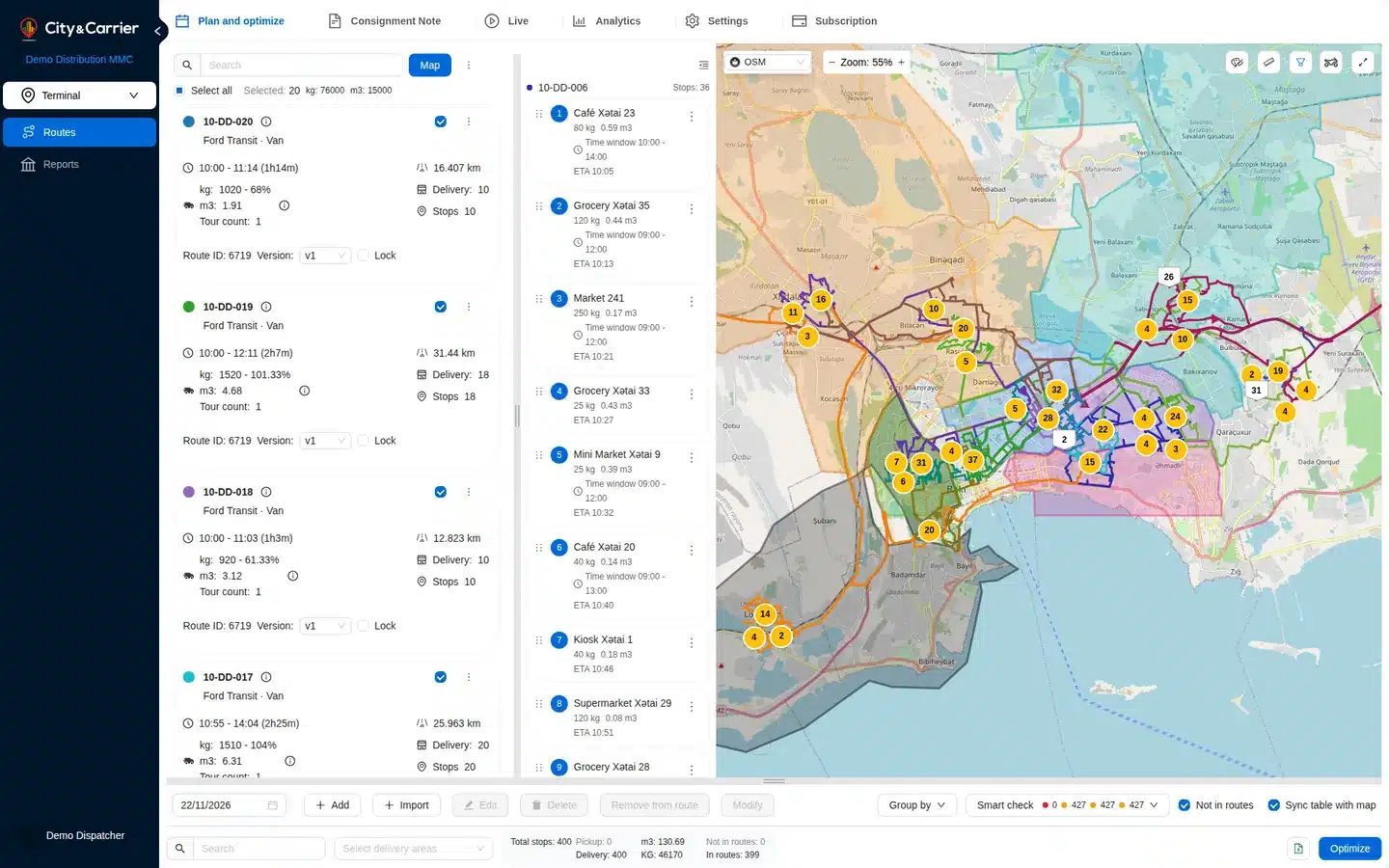
routeDesk is the City & Carrier web application for companies with several drivers. Import the day’s stops, let the optimizer build routes for the whole fleet on a map, and send each route to the driver’s phone. Start on routeDesk Free.
routeDesk plans
For one vehicle or a first try
routeDesk Free
€0
- Up to 50 stops per plan
- Optimize 1 vehicle at a time
- 30 optimizations a day
- Send routes to drivers’ phones with navigation
- Live tracking with planned vs actual km
- 1 photo per stop
For fleets
routeDesk Pro
Price on request
- From 3 vehicles, more can be added
- Optimize all vehicles at once (whole-fleet optimization)
- The optimizer assigns stops to vehicles
- Up to 1000 stops per plan by default, 5,000 / 10,000 / 15,000 by contract
- Longer search for better routes: 120 s by default, configurable
- Address search included (fair use)
- Your drivers get Pro in the deliveryPlanner app
- Unlimited photos, customer signature, POD PDF for customers
Both plans: all constraints, delivery and excluded areas, Excel export, API keys and reports. The price of routeDesk Pro will be published on this page before card payments start. Until then business plans are agreed individually: contact us.
Plan the whole fleet before the first van leaves.
One screen for the dispatcher, one app for every driver.
- Import in minutes
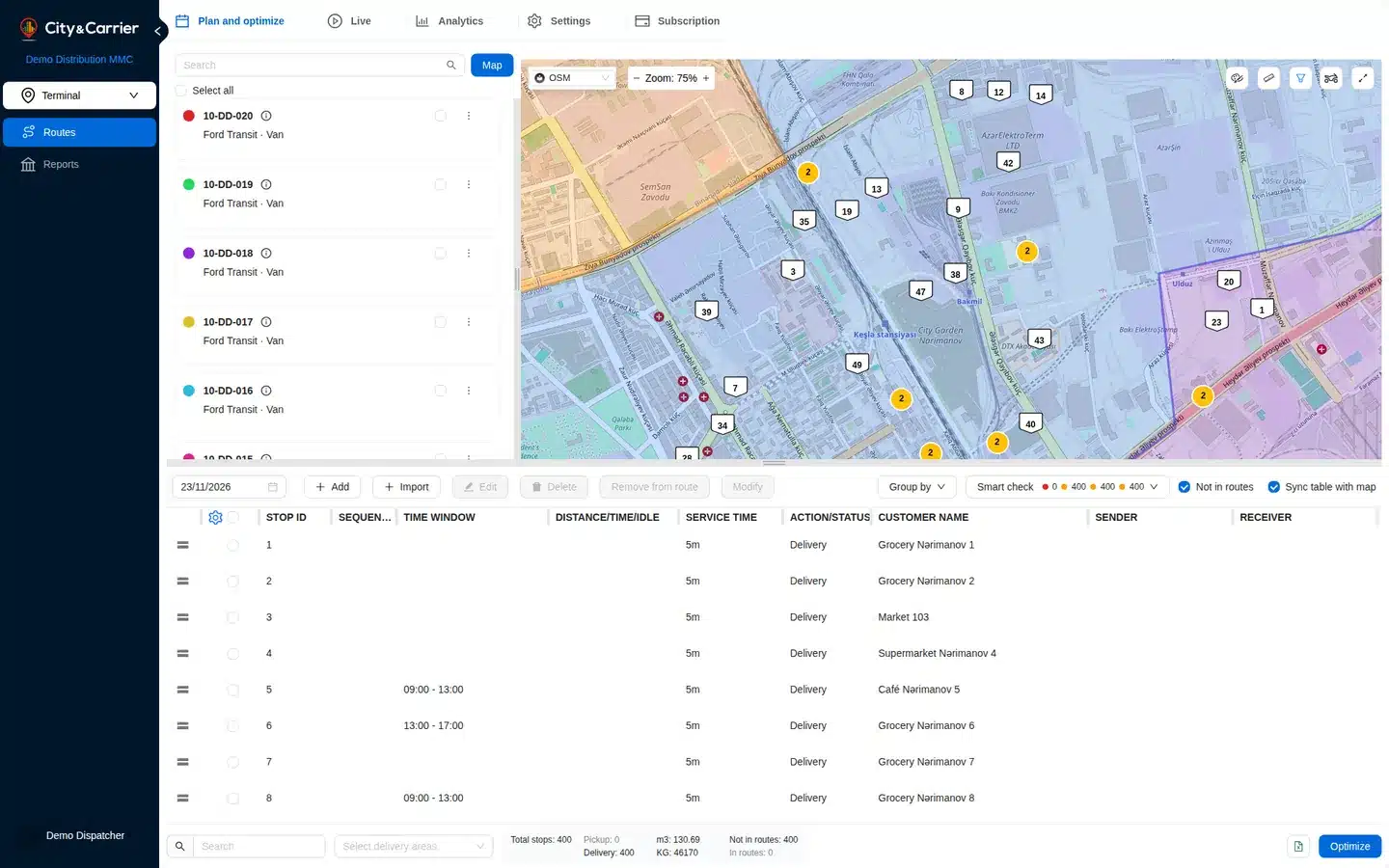
Upload an Excel or CSV file, paste a list of addresses or add stops by hand. A data check flags stops without coordinates before you optimize. - Routes for several vehicles at once
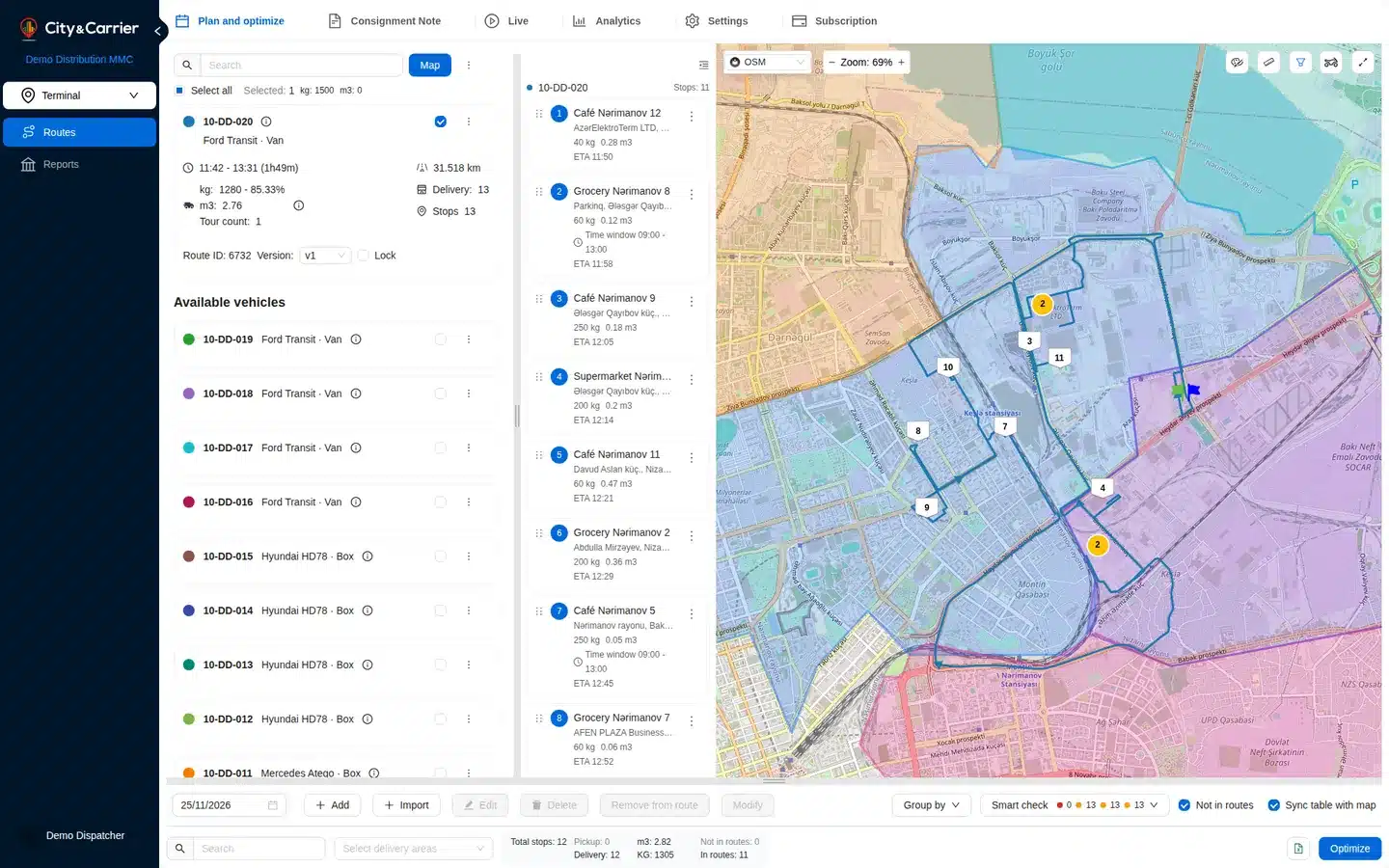
Set capacity by weight and volume, shifts, breaks and time windows. The optimizer splits the stops between your vehicles and orders them on the map. - Edit the plan your way
Move stops between routes, remove a stop, recalculate one route or keep the order as it is, and lock a route you are happy with. - Follow the day and learn from it
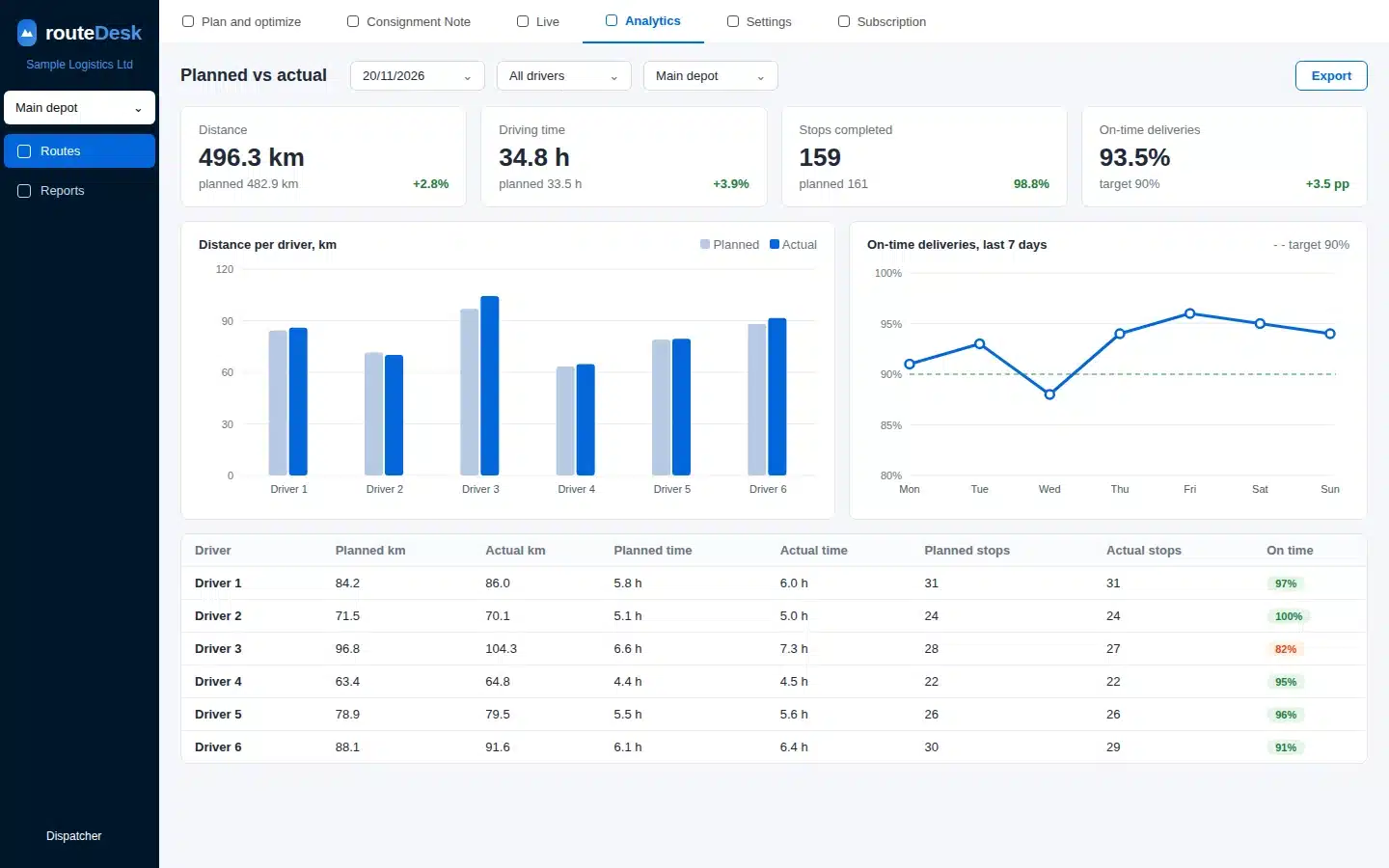
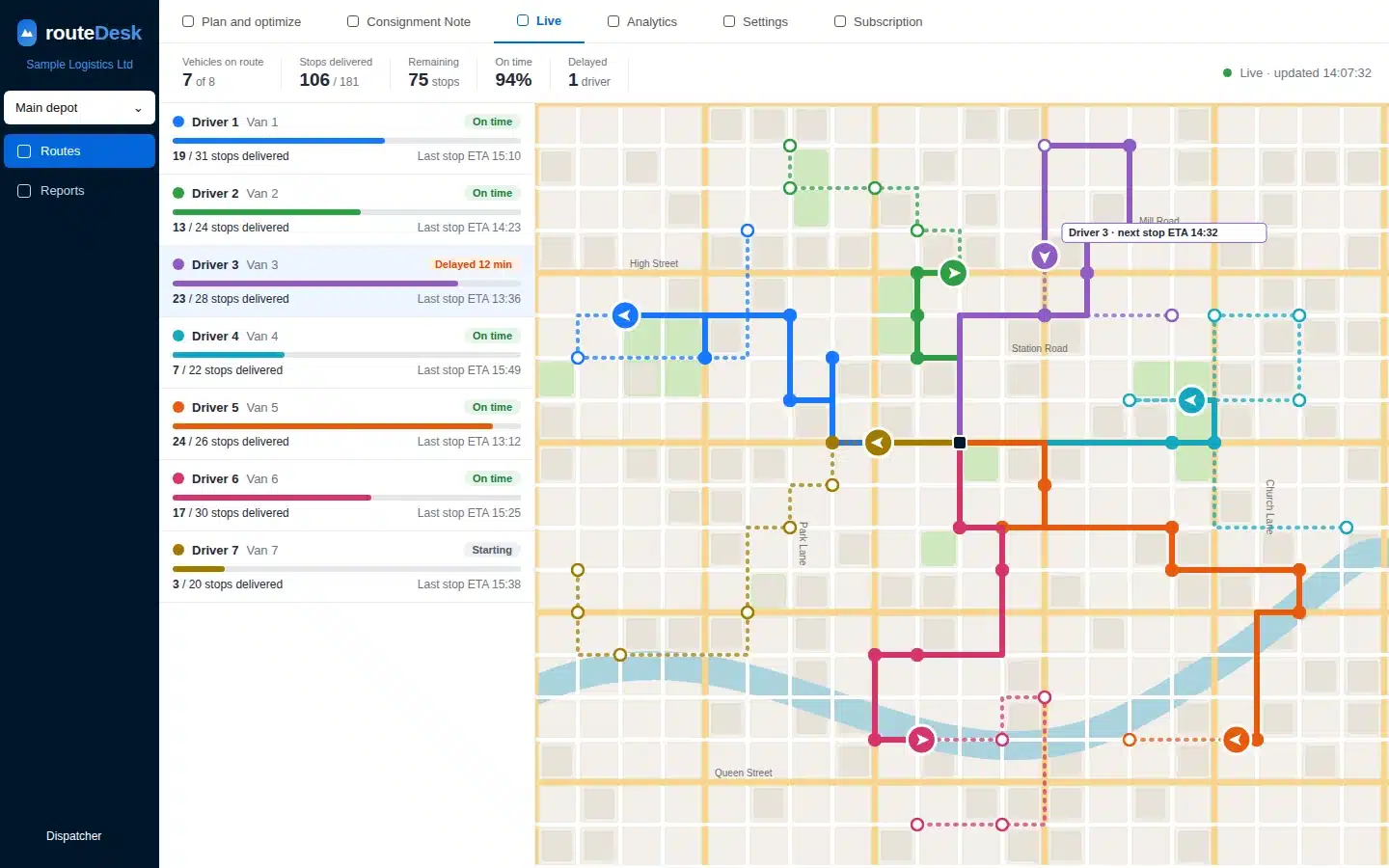
See assigned drivers on the Live tab, then compare planned and actual distance and time, with completed and skipped stops, on the Analytics tab.
How routeDesk works
- Add your stops.
Upload an Excel or CSV file and map the columns, paste addresses, or click the map. - Set vehicles and rules, then optimize.
Choose vehicles, shifts, time windows and capacities. The routes for the whole fleet appear on the map. - Send routes to drivers.
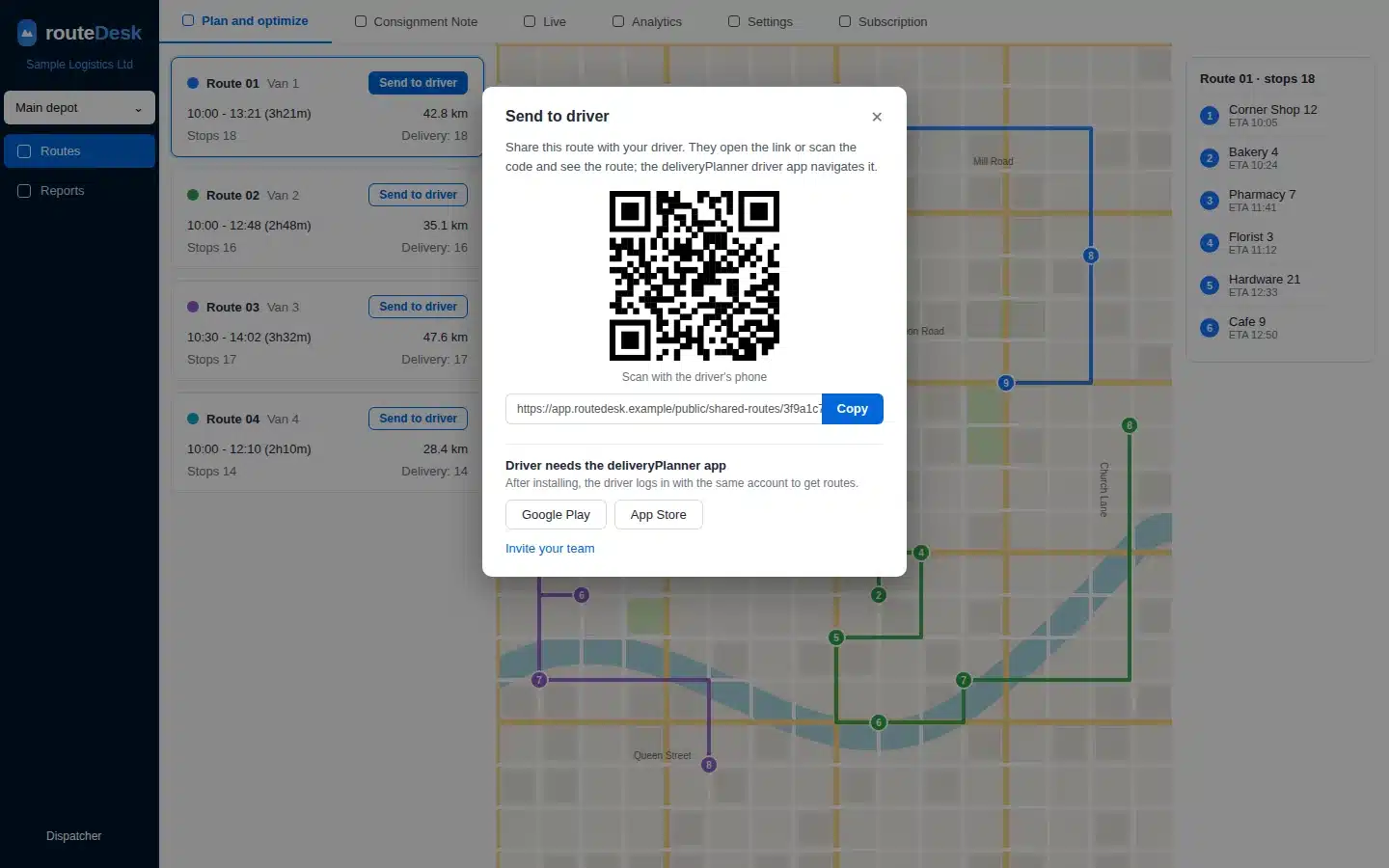
Assign a route to a driver or send a link and QR code. The driver opens it in the deliveryPlanner app and logs in with the same account.
Drivers use the free deliveryPlanner app for iPhone and Android. Developers can reach the same optimizer through the routeOptimizer API.

Free to start
– 1 vehicle per optimization
– Up to 50 stops per plan
– Up to 30 optimizations a day
Create an account, plan your first routes and see how routeDesk fits your operation. When you need more vehicles and higher limits, routeDesk Pro lifts them.
What routeDesk does
Constraints that match real work: Vehicle capacity by weight and volume, shifts and breaks, time windows, service times, priorities, pickup and delivery stops.
Areas and clusters: Draw delivery and excluded areas, limit the distance between stops and group stops into clusters automatically.
Drivers on the same account: Assign routes, send a link or QR code and let drivers navigate in the deliveryPlanner app.
Team, export and API: Invite your colleagues, export plans to Excel and create API keys for your own software.
Proof of delivery
Drivers collect the proof at the door, and you see it in routeDesk.
- Photos at pickup and delivery
Drivers take photos at each stop in the deliveryPlanner app. Every photo is stamped with the time and GPS position, and you see it on the stop in routeDesk. routeDesk Free keeps 1 photo per stop, routeDesk Pro has no limit. - Customer signature
The recipient signs on the driver’s phone and the signature is attached to the stop. Included in routeDesk Pro. - Failed deliveries with a reason
When a stop fails, the driver picks why (not home, wrong address, refused, no access, damaged or other), adds a comment and, if needed, a photo. - Proof-of-delivery PDF for your customer
From the app the driver e-mails the customer a PDF with the address, delivery time, photos and signature. Included in routeDesk Pro. - SMS before arrival
One tap in the app sends the customer an SMS with your own message before the driver arrives. The driver sends it, it is not automatic.
Advanced routing
Control which roads, areas and vehicles the optimizer uses.
- Road restrictions
Draw excluded areas for a run and no route will use roads inside them. You can also ask the optimizer to avoid ferries, highways and toll roads where possible (a preference, not a ban). Stored road closures with dates, reused by every run, are available through the API. - Slower zones
Through the API you can make travel inside chosen polygons slower (multiply the travel time or add a fixed cost), for example for a city centre. Each vehicle also has a speed coefficient in the dashboard. Otherwise travel times come from the map engine for the vehicle type you choose: car, truck, bus, bicycle, motorcycle, scooter or pedestrian. - Delivery areas
Draw polygons on the map or import them, save them, and select one or several delivery areas. Only the stops inside the selected areas are optimized. - Whole-fleet optimization
Select several areas and all your vehicles and plan them in one run with one result, instead of area by area. Tick even load distribution to balance the work across the fleet. - Geocoding
Addresses are found with OpenStreetMap by default. Add your own Regio key (Estonia, Latvia, Lithuania) or Google key to search with them too. HERE is coming soon.
Reports
Available today
- Analytics tab: planned versus actual distance and duration per vehicle, with completed and skipped stops.
- Savings card: kilometers, minutes and fuel saved compared with the original order of stops.
- Excel export of plans and routes.
Coming soon
- New plan-versus-actual reports in six tabs: Dispatcher, Driver, Garage, Finance, Sales and Overview.
- PDF and Excel export of the day’s results, and share links.
- A client report link: delivered stops with photos and signatures, to send to your customer.
- A daily summary by e-mail as PDF or Excel, with failed deliveries and their reasons.
- Your own list of failure reasons.
routeDesk FAQ
What is routeDesk?
routeDesk is a web application for companies to plan delivery routes for several drivers: import stops, set vehicles, shifts and constraints, optimize on a map, assign routes to drivers, follow them and review planned versus actual results. Unlike smartDelivery, which is the all-in-one platform for courier companies, postal operators and retailers (orders, PUDO points, warehouse), routeDesk is for planning and dispatching routes. It suits companies that run delivery rounds with more than one driver or vehicle; a single driver can use the free deliveryPlanner app instead.
What does routeDesk Free include?
routeDesk Free covers one vehicle per optimization, up to 50 stops per plan and up to 30 optimizations a day. It is meant for trying routeDesk on your own stops.
What is routeDesk Pro and how much does it cost?
routeDesk Pro is the paid plan for fleets: from 3 vehicles with more available, optimization of all vehicles at once and up to 1000 stops per plan by default. Price on request. The price will be published on this page before card payments start. Until then business plans are agreed individually, contact us.
How do my drivers get their routes?
Drivers use the deliveryPlanner app for iPhone and Android. You assign a route to a driver or send a link and QR code. The driver installs the app and logs in with the same account.
How do I import my stops?
Upload an Excel or CSV file (.xlsx or .csv) and map the columns, paste a list of addresses, or add stops by hand or on the map. A data check flags stops without coordinates before you optimize.
Which constraints can I set?
Vehicle capacity by weight (kg) and volume (m³), including vehicles with two compartments; shift hours; start and end depot, or an open route that ends at the last stop; several tours a day with reload time at the depot; a maximum number of stops; delivery time windows; service time; stop priorities; pinning a stop to a vehicle; pickup and delivery pairs; and one break with a time window and a duration. The break place can be set through the API or in the deliveryPlanner mobile app; in the web dashboard it is coming soon, and the dashboard sets the break’s time and duration. Delivery areas, excluded areas and road preferences are described in the Advanced routing section above. See the full table of constraints.
Can I follow my drivers and review the results?
Yes. The Live tab shows the routes and tracks of assigned drivers on the map. The Analytics tab compares planned and actual distance and duration and shows completed and skipped stops.
Do drivers capture proof of delivery?
Yes. In the deliveryPlanner app drivers take photos at pickup and delivery, stamped with the time and GPS position, and you see them on the stop in routeDesk. routeDesk Free keeps 1 photo per stop; routeDesk Pro has unlimited photos, the customer’s signature on the phone and a proof-of-delivery PDF that the driver e-mails to the customer from the app. When a delivery fails, the driver picks a reason, adds a comment and an optional photo. Drivers can also send the customer an SMS before arrival. A client report link with delivered stops, photos and signatures is coming soon.
Is there an API?
Yes. routeDesk runs on the same optimizer as the routeOptimizer API. Account owners and admins can create API keys in the dashboard. Documentation: apidoc.citycarrier.com.
Which languages does routeDesk speak?
The web interface is available in English, Russian, Azerbaijani, Estonian, Lithuanian and Latvian.
How do payment, cancellation and refunds work?
Paid plans are billed per period, by card or by invoice. A change of plan takes effect from the next period, and routes and data are kept if you return to routeDesk Free. The details are in our terms on cancellation, refunds and chargebacks.
Plan your next delivery day with routeDesk
Start on routeDesk Free, or talk to us about routeDesk Pro for your fleet.