
To plan a delivery route with up to 50 stops for free, add your addresses to a route planner app, let it optimize the stop order, and drive the route stop by stop in your navigation app. City & Carrier Delivery Planner does this on the free plan: up to 50 stops per route, with the essential features included.
Want to try it without installing anything? Use the free online route planner for up to 25 stops.
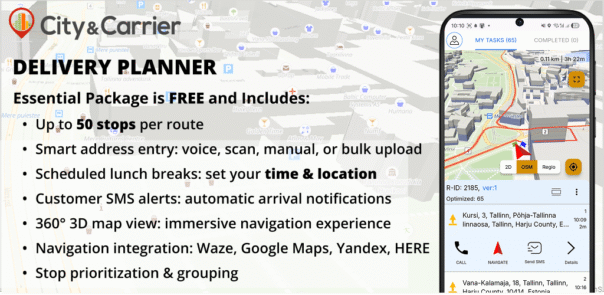
Why is a 50-stop route hard to plan by hand?
Fifty stops can be put in order in an enormous number of ways, and the shortest order is rarely the one on your manifest. Ordering them by street or postcode helps, but it ignores one-way streets, river crossings and the time you lose turning back. A route optimizer compares the options for you in seconds.
Navigation apps are built for getting from A to B, not for ordering dozens of stops. Many route planner apps for drivers limit the free plan to a smaller number of stops per route. If you carry 30 to 50 parcels a day, that limit decides whether the free plan is usable at all.
How do you plan a 50-stop route step by step?
- Install the app. Download City & Carrier Delivery Planner from the App Store or Google Play and create a route.
- Add your stops. Say the address, scan it from the parcel label, or import a file with all addresses. You can also type a stop by hand.
- Check the addresses. The app shows every stop on the map. Fix any address that lands in the wrong place before you optimize.
- Add a break. Set the time and place of your break, and the app plans the route around it.
- Optimize. The app puts the stops in an efficient order. Move a stop manually or mark it as a priority if a customer needs it first.
- Drive. Open each stop in Google Maps, Waze, Yandex or HERE WeGo, mark it delivered and go to the next one.
- Change the plan during the day. Add or remove a stop and optimize the rest of the route again.
What does the free plan include?
| Feature | Delivery Planner, free plan |
|---|---|
| Stops per route | Up to 50 |
| Routes | Unlimited (fair use) |
| Address entry | Voice, label scan, file import, manual |
| Route changes | Re-optimize after adding or removing stops |
| Breaks | Time and place, planned into the route |
| Customer messages | Arrival notifications by SMS |
| Map | 3D map view |
| Offline | Works without mobile coverage |
| Navigation | Google Maps, Waze, Yandex, HERE WeGo |
| Languages | 8: English, Polish, Russian, Estonian, Latvian, Lithuanian, Azerbaijani, Ukrainian |
How do you avoid failed deliveries on a long route?
- Message the customer before you arrive. An SMS with your arrival time gives the recipient a chance to be home or leave instructions.
- Put time-critical stops first. Mark them as a priority before you optimize.
- Plan the break into the route. A break added in the app keeps the arrival times realistic.
- Use the 3D map at the stop. The 3D map view helps to find the entrance in courtyards and large buildings.
When is a free route planner not enough?
A free planner fits one driver planning his own day. A company that plans routes for many drivers, assigns orders to vehicles and needs to see the day on one screen needs dispatch software. For courier companies and postal operators City & Carrier offers smartDelivery; developers can plan routes in their own system with the routeOptimizer API.
Frequently asked questions
Is there a free route planner for 50 stops?
Yes. City & Carrier Delivery Planner lets you plan up to 50 stops per route on the free plan, on iPhone and Android. Routes are unlimited (fair use).
Does the app work offline?
Yes. Delivery Planner also works without mobile coverage, so a weak signal does not stop your route.
Can I import my stops from a file?
Yes. Import a file with your addresses, or add stops by voice or by scanning parcel labels.
Which navigation apps does it work with?
Google Maps, Waze, Yandex and HERE WeGo.
Next step: download Delivery Planner and plan your first route.


